



 EchoAPI for VS Code

 EchoAPI for IntelliJ IDEA

 EchoAPl-Interceptor
 EchoAPl CLI
 EchoAPI Client
 API Design
 API Debug
 API Documentation
 Mock Server


API Design Guide: Google-Style Naming for Parameters
This article discusses the principles and real-world examples of Google-style parameter naming — including how to choose the right terms, handle compound words, and balance clarity with conciseness in code.


In API development, the elegance of parameter naming directly impacts code readability and team collaboration efficiency. Clear and consistent naming reflects developer professionalism and enhances API usability. This article explores the importance of well-crafted names and provides practical guidance based on Google’s style guide to help teams achieve a more efficient development workflow.
1. Elegant Parameter Naming vs. Poor Naming
Scenario: Product Query API
Parameters to pass:
- Product ID
- Category Name
- Price Range
Naming Comparison
Recommended (Standard) Naming:
productId(Product ID)categoryName(Category Name)priceRange(Price Range)
This naming approach is intuitive and professional.
Poor Naming:
prodId(unclear abbreviation)catName(could be misunderstood as “cat name”)price(vague; unclear if it refers to a single price or a range)
Other Inappropriate Examples:
pr(abbreviation, hard to understand)
2. Core Principles from Google’s Style Guide
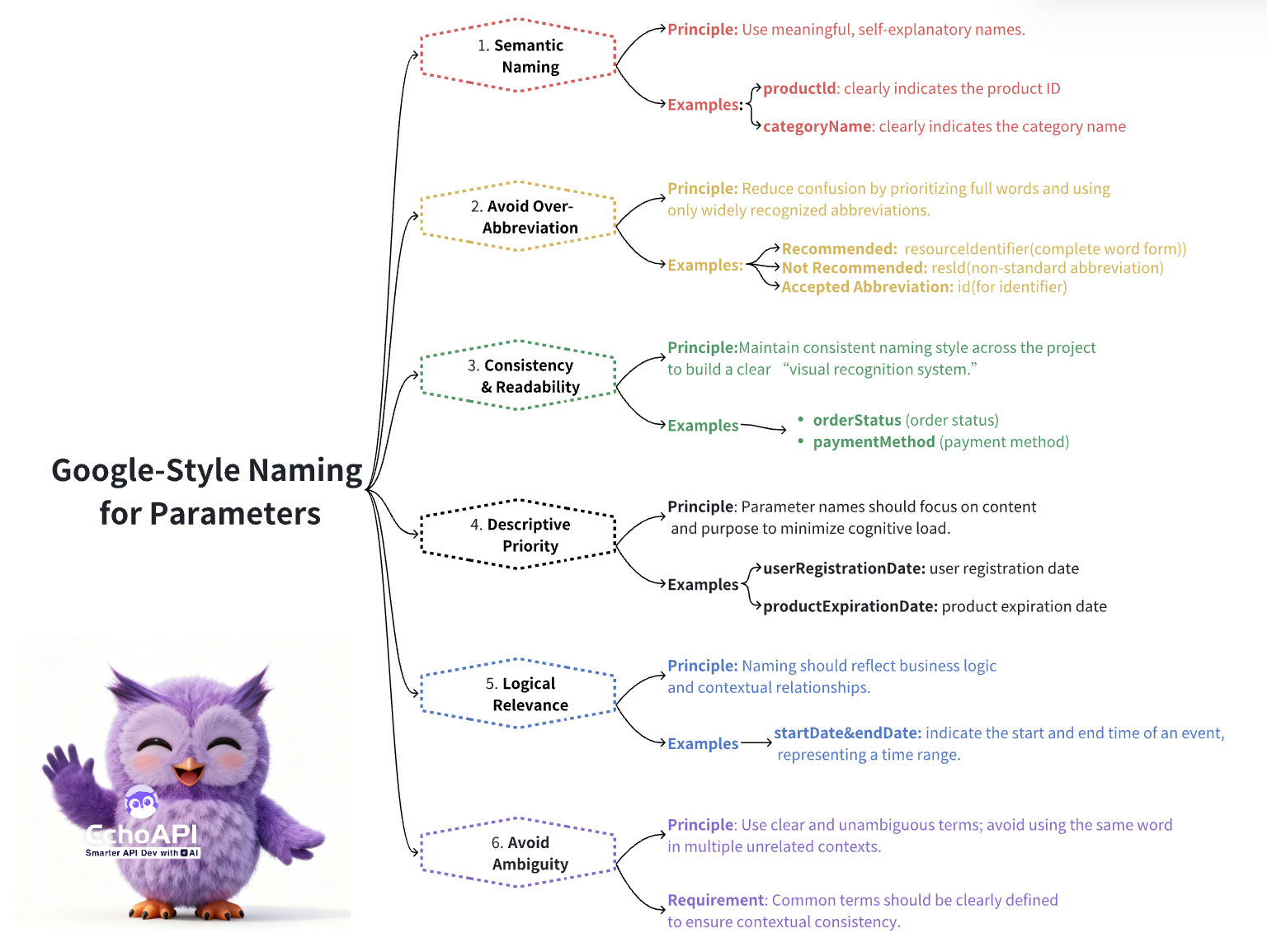
Google’s API design style guide is widely recognized as an industry standard. Key principles include:
1. Semantic Naming
Parameter names should clearly convey their meaning, allowing any developer to understand their purpose at a glance.
Examples:
productId: clearly indicates the product IDcategoryName: clearly indicates the category name
2. Avoid Over-Abbreviation
While abbreviations save space, improper use can lead to confusion. Google recommends:
- Use full words:
resourceIdentifierinstead ofresId - Only use widely recognized abbreviations, e.g.,
idfor “identifier”
3. Consistency & Readability
Maintain consistent naming conventions across the project, creating a “visual recognition system.”
Examples:
orderStatusandpaymentMethodfollow a consistent naming style, enabling faster team communication
4. Prioritize Descriptiveness
Names should reflect their content and purpose:
userRegistrationDate: clearly indicates when the user registeredproductExpirationDate: clearly indicates when the product expires, reducing cognitive load
5. Logical Relevance
Parameter names should reflect business logic:
startDate&endDateindicate the start and end of an event, naturally representing a time range
6. Avoid Ambiguity
Ensure naming is clear and unambiguous. Avoid using the same word in multiple contexts. Common terms should be clearly defined and used consistently.
3. Solutions for Naming Challenges
Challenge 1: Language Barrier
Non-native English speakers may face limited vocabulary or grammatical issues when naming parameters.
Solution:
- Use common words, leverage translation tools, and refer to open-source project naming conventions
Challenge 2: Naming Conflicts in Team Collaboration
Different developers may interpret the same concept differently, leading to naming conflicts.
Solution:
- Establish a team naming convention, standardize on camelCase or snake_case, and ensure consistent application
Challenge 3: Rapid Iteration Causing Naming Chaos
Fast-paced development may result in temporary or inconsistent names, making maintenance harder.
Solution:
- Allocate time for naming refinement and use intelligent tools like EchoAPI AI to assist with standardized naming
4. EchoAPI AI: Intelligent Parameter Naming
Feature Overview
Parameter naming can be challenging in API-first development environments. EchoAPI AI automatically generates standardized parameter names following Google’s style guide, effectively addressing this challenge.
Use Case:
When designing API request and response parameters, developers may lack standard naming conventions or sufficient vocabulary.
Solution:
Developers simply describe the intended parameter or scenario, and the AI generates standardized names, allowing the user to specify preferred naming conventions.
How to Use
- Describe the parameter’s purpose, e.g., “Parameters for a product query API include Product ID, Category Name, and Price Range.”
- Click to copy the generated names and apply them directly in code, simplifying the development process.
Real-World Example
For an order payment API, entering the description into EchoAPI AI quickly generates:
orderId,paymentMethod,amount
These standardized names improve code readability and greatly reduce confusion during team collaboration.
⚡️ Pro Tip
Beyond intelligent naming, EchoAPI includes multiple features and updates for enhanced API development.
EchoAPI AI Edition: Key Updates at a Glance
- AI Assistant & API Management Upgrades: New intelligent features including AI-generated test cases and reports, standardized parameter naming, and mock data generation to boost API efficiency.
- Enhanced Automated Testing: Supports database operations, visual assertions, and improved test reports, including SSE (streaming response) aggregation.
- Optimizations & Bug Fixes: Streamlined workflows, improved user experience, and resolution of known issues to ensure platform stability.
Summary
With EchoAPI AI’s intelligent naming feature and Google’s naming guidelines, parameter naming in API development is no longer a challenge. Download EchoAPI and start a new chapter of efficient development, making team collaboration smoother than ever!
